
Understanding Instagram Video Formats, Quality, and Resolution
Video content dominates Instagram, with Reels, Stories, feed videos, and IGTV all competing for attention. Understanding how Instagram handles video formats and quality can help you make better decisions when uploading, viewing, and downloading video content.
Instagram Video Types
Instagram supports several different video formats, each with its own specifications:
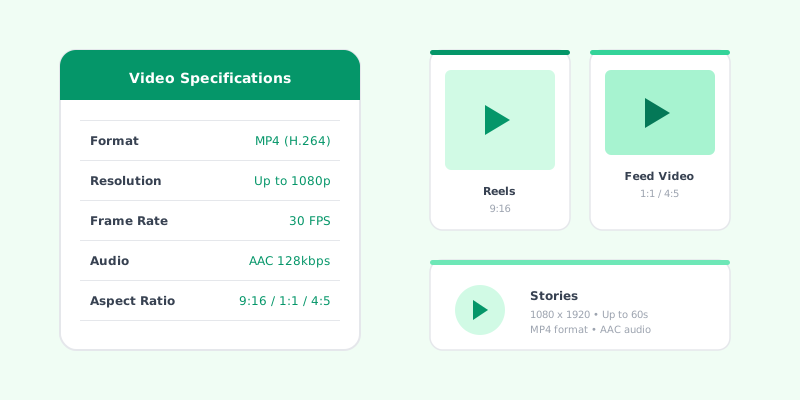
Feed Videos Regular feed videos can be up to 60 minutes long. They appear in the main feed and on your profile grid. The recommended resolution is 1080 x 1080 pixels for square videos or 1080 x 1350 for portrait orientation.
Instagram Reels Reels are short-form vertical videos, typically between 15 and 90 seconds long. They use a 9:16 aspect ratio (1080 x 1920 pixels) and are designed for full-screen vertical viewing.
Instagram Stories Stories are also vertical (9:16) and can be up to 60 seconds per segment. They disappear after 24 hours unless saved to Highlights.
Live Videos Instagram Live allows real-time broadcasting. Once a live session ends, it can be shared as a replay for followers to watch.
Video Compression on Instagram
When you upload a video to Instagram, the platform compresses it to reduce file size and ensure smooth playback. This compression means that the video quality you see on Instagram is slightly lower than the original file. However, Instagram has improved its compression algorithms over the years, and the quality loss is minimal for most content.
Optimal Upload Settings
For the best results when uploading videos to Instagram, follow these recommendations:
- Format: MP4 with H.264 codec
- Frame rate: 30 frames per second
- Resolution: 1080 pixels wide minimum
- Bitrate: 3,500 kbps for 1080p content
- Audio: AAC audio codec, 128 kbps
Downloading Instagram Videos
When you download videos using iSaver, you receive the video in the quality that Instagram serves to users. This is typically:
- Resolution: Up to 1080p depending on the original upload
- Format: MP4 (H.264 video with AAC audio)
- File size: Varies based on video length and quality
Playing Downloaded Videos
MP4 files are universally compatible. You can play downloaded Instagram videos on:
- Any smartphone (iOS or Android)
- Desktop computers (Windows, Mac, Linux)
- Smart TVs
- Tablets and iPads
- Media players like VLC
Conclusion
Understanding Instagram's video ecosystem helps you both as a creator and a viewer. When downloading videos, tools like iSaver ensure you get the best available quality in a universally compatible format.